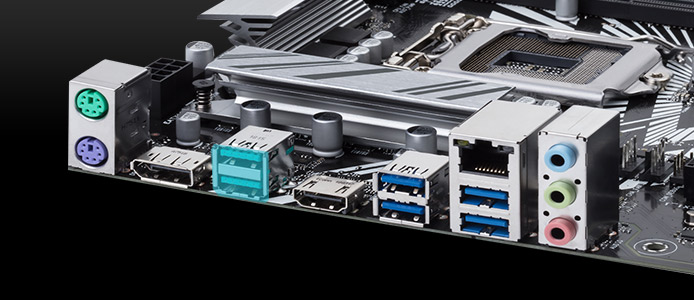
Motherboards are one of the most important parts of the computer. If you do not know what it is, the motherboard is the piece of the computer where everything is connected so you can operate for the day for your personal use. The ASUS Prime Z390-P is a great option for the user.
This motherboard is one that a person can use at home. This is a very simple yet very equipped motherboard.
Some of the things on this motherboard is that it has very good memory. There are many types of memory that are accepted such as DDR4 4266 all the way to 2133. The max memory on this is 64GB.
CPUs
Since this CPU has a socket of an LGA 1151, the processors accepted are the Pentium Gold, Celeron, and the Intel Core i8 and i9.
Speed
The speed is very important for a motherboard because no one wants a slow computer. This is a(n) Intel Z390 and has a SATA GB/s for its speed.
The integrated Components are a great thing to look at when you are looking at a motherboard. They are :
Audio, Video, VGA, etc.
Expansion Slots
1 x PCIe 3.0/2.0 x16 (x16 or x8+ x4+ x4)
1 x PCIe 3.0/2.0 x16 (max at x4 mode)
4 x PCI Express 3.0/2.0 x 1 slots
Back Panel
1 x PS/2 keyboard
1 x PS/2 mouse
1 x DisplayPort
1 x HDMI
1 x LAN (RJ45) port
2 x USB 3.1 Gen 2 Type-A
4 x USB 3.1 Gen 1 Type-A
So?
You have read all this information and are thinking, “So what?” Well, what I am trying to say is that this motherboard is a great motherboard for any user. Also, the company that makes them is very special as well. They are an amazing company that makes amazing products such as this motherboard. To see more about this motherboard, I will have two links to show you how good this motherboard is. One of the links is ASUS.com and the other is Newegg.com.
The motherboard I tried out is the Asus ROG MAXIMUS XI CODE, AT first I was a little nervous that I would have to spend a little bit to much on this mother board, and all the required parts but that wasn’t the case. The mother board itself was only $349.99, Which is not a bad price for a Gaming mother board. The motherboard itself does come in fact with a great many things, like”
1151 Intel socket for 9th and 8th Gen CPU’s.
2133 DDR4 dual channel architecture memory of up to 64 GB ( 4 sticks of 16 GB).
2 x16 PCIe slots for expansion Cards.
Aura Sync (colored leds that can be changed to preference).
8 channel high definition Audio.
2 M2 Slots and 6 sata Ports.
I tried the in my home computer and it was amazing Game play like I have never seen before ( My home computer is old, so game play was SLOW). I used just a couple sticks of Ram and used a little 8th Gen i5-8400, has 9MB of Cache and 2.8-4.0 frequency, It was like a brand new computer (technically it is a new computer).
Of all the gaming motherboards I’ve used over the years, this one stands out. It pushes boundaries in every department, with tons of room for expansion. In this review, we’ll go through the many reasons this is a great option for gamers.
Well, everyone knows the heart of a computer is the processor. A powerful one is required to play hardware-intensive games as well. With support for 1st and 2nd gen AMD Threadrippers, there’s no lack of power concerning the CPU.
Another important aspect for gaming, or computing in general, is memory. This motherboard has plenty of space there. There aren’t two memory slots; not four, or six; but rather, eight. That’s right; this thing packs eight DDR4 memory slots. With a max capacity of 128 gigabytes, and overclocked speeds of over 3600 mhz; there’s more than enough memory capabilites to go aroujnd.
One more hugely important thing for a gamer is expansion cards. You want to be able to add graphics cards, right? Well, rest assured; you can here. It’s got one PCIe x1 slot, and four PCIe x16 slots. Yep, you can run two dual-slot GPUs on this sucker if you wanted to.
Lastly, you’re gonna need lots of space for all those games. Have you seen some of the big games lately? They’re anywhere from fifty to a hundred gigs, for a single game! That takes up some room. There’s no reason to worry with the Meg though. The Creation has three m.2 slots. That’s absolutely unheard of. Along with the 8 SATA III ports, you can hook up hard drive after hard drive to this board; SSD after SSD. Those big games don’t seem so scary after all now do they?
Now for my experience while using it. I’ve got mine configured with a 2nd-gen threadripper CPU, 64 gigs of ram, GeForce 2080 Ti graphics, and a total of 3 TB of SSD storage. It takes everything I throw at it. I can play any game on the highest settings and hit 120 FPS or more. Boots up in about six seconds, and performs simple task with ease. Of course, I’ve got some good internals hooked up to it, but this just goes as an example.
In the market for a gaming motherboard? Well definately consider the Meg X399 Creation from MSI. Sure, $600 is a hefty wad of cash, but I consider it money well spent. I bought mine back in August when it came out, and there hasn’t been a day I’ve regretted it. With great spec capabilities, and lots of future proofing, you won’t regret it either!
Specifications List
Form factor: Extended ATX
CPU socket: AMD TR4
Compatible with: 1st and 2nd generation AMD Threadripper CPUs
Memory: 8 DDR4 slots with overclocking speeds of over 3600 mhz. Maximum RAM is 128 gigabytes.
Storage: 8 SATA IIIs, 3 M.2s
Expansion: 4 PCIe x16s, 1 PCie x1
Integrated components: 7.1 channel audio and LAN with AC wifi and bluetooth 5.0.
Ports on the rear (from left to right)
9x USB 3 A ports
2x RJ45 ports
1x USB 3 C port
1x optical S/PDIF port
5x audio ports
Others’ Opinions
“The MSI MEG X399 Creation is clearly designed to please more than just content creators and professional users, especially given the tools and features included. The sixteen-phase power delivery and dual 8-pin 12 V CPU power inputs are something extreme overclockers and hardcore enthusiasts will be interested in, and the eight SATA ports in addition to the three M.2 PCIe 3.0 x4 slots built-in are something workstation users and video renderers will be keen to take advantage of.” -Gavin Bonshor, anandtech
“Ultra- premium X399 is all about finding ways of making your board a bit different from the rest. Massive M.2 support, over-the-top power delivery and a restrained look mark out the MEG X399 Creation.” -Tarinder Sandhu, hexus
“KitGuru says: MEG X399 Creation is the most impressive motherboard we have ever seen. Nuff said.” Leo Waldock, kitguru
So imagine that you need a great gaming motherboard for your new Ryzen CPU. Well have no fear as the Gigabyte X470 Aorus Gaming 7 Wifi has got you covered with extensive coverage of both non overclock and overclock speeds for the price. It comes with the specifications provided by Gigabyte.com
ATX form factor
Support for up to AMD Ryzen 2nd Generation
AMD X470 Chipset
4 DDR4 sockets for up to 64 GB of RAM
Dual channel support
Non overclock speeds of 2933 / 2667 / 2400 / 2133 MHz
2 PCI Express x16 slots (Running at x16 and x8 respectively)
2 PCI Express x1 slots
Support for both NVIDIA SLI and AMD CrossFire for either 2 or 4 GPUs
Storage Devices
1 M.2 connector with both SATA and PCIe 3.0 x4/x2 SSD support
1 M.2 connector supporting PCIe 2.0 x4/x2 SSD
6 SATA 6Gb/s connectors
Voltage, Temperature, Fan speed, and Water cooling flow rate detection
Overheating and fan failure warning
Fan speed control
So much RGB lighting.
With a MSRP of $239.99, this motherboard averages around 4 eggs on Newegg. just look at these reviews:
Pros: Amazing VRNs Amazing VRN cooling ( not even necessary with such high efficiency VRN) Onboard Wifi is nice and effective Cons: BIOS layout is definitely subpar Other Thoughts: Huge upgrade from Asrock AB350 pro
Timothy L.
Pros: After reading all the reviews here it was difficult to decide to get this board or not as half the people here where having problems with this board supposedly………… But because it was the best looking board in its class with some really interesting features I took a risk. I installed it in a corsair air 540 case. The board looks great with lighting all around and in the middle with the memory and PCI lanes lite up. it is very fast from boot to desktop, I’m very happy with it and glad I made the decision to get it compared to what’s out there. Also unlike some of my other boards the two M.2 slots do not interfere with closing down certain SATA ports which was convenient Cons: NA
Joseph C.
This motherboard is a great gaming motherboard given the price point and the versatile overclocking potential. Like all Gigabyte motherboards, Gigabyte has a 4 year warranty if something breaks. I would recommend this motherboard to anybody needing a great gaming motherboard
When it comes to performance from a gaming motherboard, the Z370 Gaming K6 Motherboard from ASRock is the way to go. This motherboard has a lot of room when it comes to choosing memory speed and storage. It also comes with these specifications.
Supports Purity Sound 4 and Creative Sound Blaster Cinema 3
8 SATA3, 2 Ultra M.2 (PCIe Gen3 x4 & SATA3)
2 USB 3.1 Gen2 10Gb/s (1 Type-A and 1 Type-C), 9 USB 3.1 Gen1 (1 Front Type-C, 4 Front Type-A, 3 Rear, 1 Fatal1ty Mouse Port)
Dual Intel Gigabit LAN
ASRock RGB LED
Intel Optane Memory Ready
This motherboard is very solid when it comes to overclocking and it is easy to set up. Since my voice is not enough support, take a look at all of these reviews (via Amazon).
“One of the best Z370 MoBos available for overclocking (12 phase V-regs, what more can you ask for?) Tons of features, easy to set up BIOS, good stock cooling/heat sinks, nice to look at, just a great motherboard.”
~Jarred V.
“I upgraded from a Asus Gene V. Paired this with an 8700k. Overclocked to 4.8 with a Noctua heat sinks. Voltages running about 1.3. The 12 phase VRM is a nice feature. I could probably get to 5 with an AIO water cooler. Only complaint is that it doesn’t offer as much flexibility as the Asus board in offset mode.”
~John H.
It also comes with all the necessities straight out of the box.
What’s included with the motherboard
Even though the Z370 Socket 1151 does not support previous generation Intels, I highly recommend this because of its overclocking potential, memory support when overclocked, and overall storage.
Check out these reviews from Eteknixs and Hardware Secrets for more information about the Gaming K6 from ASRock.
<![CDATA[This is a review on the BIOSTAR X370GT5-NF motherboard. The BIOSTAR X370GT5 is a high-end gaming motherboard available at newegg for $59.99. I believe this is a great gaming motherboard option as well as business option. This motherboard is made by BIOStar, which is a very well respected motherboard manufacturing company. BIOStar was rewarded top 20 Global Brand as of 2008, and has an estimated brand value of $46 million (Wikipedia). The BIOSTAR X370GT5-NF motherboard is apart of the second generation racing series. This motherboard is built with excellent components and many advanced features for optimal performance. Specifications:
Chipset- AMD X370
DDR4 3200(OC)/ 2933(OC)/ 2667/ 2400/ 2133/ 1866
* DDR4 2667 for AMD Ryzen CPU
64 GB memory
Dual Channel
1 x PCI-E x16 3.0 Slot (x16 for Ryzen CPU only, NPU/APU run at x8 speed)
1 x PCI-E x16 2.0 Slot (x4) (share bandwidth w/ PCI-E x1 slot, when PCI-E x1 is occupied, PCI-E x16 (x4) will run at x1 speed)
2 x PCI-E 2.0 x1 Slots
2 x PCI Slots
6 x SATA 6Gb/s
8 channels of audio
I highly recommend this motherboard for multiple reasons. One of the biggest reasons is the price. Not very often will you find a high-end gaming motherboard for a price of only $59.99. It has plenty of memory available with 64GB of memory. This motherboard also has very good speed ranges for a gaming PC as it ranges from 3200 (OC) to 2933 (OC). If you are an interested gamer or even just a normal business owner, I highly suggest getting this motherboard. At such a low price the BIOSTAR X370GT5-NF is second to none and is probably one of the best deals available on the market right now. Note: This review is part of a classroom project.
https://www.newegg.com/Product/Product.aspx?Item=N82E16813138450&recaptcha=pass
https://en.wikipedia.org/wiki/Biostar
<![CDATA[High-quality PC building is a very pricey thing to do. Some of the best builds can cost up to 3,000 dollars and much higher. This can cause builders to skimp on some products like the motherboard. The GA-Z170X-Gaming Motherboard is full of performance for its price. It also was not the worst experience for the $335 price tag.
This motherboard has many expansions slots for gaming and video editing. It also has amazing specifications
Intel Z170 Chipset
LGA 1150 Socket Type
Supports 6th and 7th generation Intel Processors (I7, I5, I3, Pentium, and Celeron)
Supports 4 sticks of DDR4 RAM duel channel
running at 2133 and overclocked speeds
maxing out at 64 GB
3 PCI E x16 3.0 Slots (Shielded to support the weight of heavy graphics cards)
3 PCI E x1 3.0 Slots
9 SATA III connectors and 2 M.2 slots
6 SATA 6 Gb/s connectors
3 SATA Express Connectors
2 M.2 Socket 3 Connectors
Support for 3-Way/2-Way AMD CrossFire and 2-Way NVIDIA SLI Technology
Supports On-board Video, Audio and LAN
Integrated Graphics Processor-Intel HD Graphics support
Realtek ALC1150
2/4/5.1/7.1-channel
Killer E2201 LAN chip
10/100/1000Mbps
These specifications are pretty hefty for a board this price. This motherboard is in theory a great choice for high end gaming or editing. There are also many drawbacks for this board. Its flimsy when it came to plugging the power connector in. Even after the board had a decent start and work fine for a while, it had died just a few months after installing it into my PC.
There are also many review one Newegg of people who had the same problem as me.
Donald V stated;
“Pros: Performed well for 8 months. Installation and operation were as expected. Nice layout and features. Cons: Died after 8 months. First board to die on me but I am not a heavy hitter. Just a gamer who updates for some added performance every 2 years or so. Minor OC. ”
Also an anonymous user stated; “Pros: Works well easy uefi and easy board software Cons: Width is slightly shorter than a normal atx board. I wouldn’t have bought it if I new that because the 24 pin power hangs on the end and the amount of force to insert the 24 pin is scary sometimes afraid of cracking the board. Also had 2 USB ports stop working on the motherboard.”
There were also many other reviews of people who had problems that had issues with it working after just a few months and had components short out.
In conclusion, this is a solid board to buy and use, but the long term of the board is not good at all due to it dying very shortly. Though it is a solid board, I personally would not recommend it due to the lifespan.
<![CDATA[Many believe in the high quality gaming market, but few can actually afford to build such a rig to meet the demands of some mainstream triple A title games now-a-days. Due to hefty costs it is no wonder why some motherboards are out of reach to the average consumer. But… Lets just say if you need a motherboard with these specs it is safe to say that you are not just an average consumer. This will leave even the hardest of tech enthusiasts drooling out their mouth when they take a glance at this product.
I present you with the MSI Gaming X99A GODlike gaming motherboard.
This motherboard is the best of the best with specs that can not be found almost anywhere else on a E-ATX board. Lets take a look at these specs:
Chipset: X99
USB Ports: 6x 3.1 (1x Gen 2 1x type-C, 4x Gen 1), 2x 2.0
Audio Jacks: 5x analog, 1x 6.3 mm, 1x S/PDIF out
Sata Connectors: 10x 6Gb/s (Shares 1x SATA-E, 1x M.2)
Compatible CPU’s: Core I7’s for the LGA 2011 v3 socket (Not backwards compatible)
Expansions Slot technologies: Supports 4-way AMD crossfire along with 4-way Nvidia SLI (With a CPU with 40 PCIe lanes). Also supports 3-way Nvidia SLI (With a CPU with 28 PCIe lanes)
Wi-Fi: Killer Wireless 1535
Lan: Killer E2400 Gigabit
Bluetooth: v4.1
This motherboard definitely does not disappoint on the spec sheet, and with a–wait for it– monstrous $999 price tag attached to it (Via Newegg) one would hope it didn’t.
What comes in the box is not disappointing either.
With premium packaging the box withholds the following:
Installation CD
8GB installation USB drive
Instruction manual
Quick start user guide
Padded I/O back-plate shield
10 SATA cables Including five with angled heads
Four flexible SLI bridges
M.2 to U.2 adapter card
Six voltage check extension leads
3.5mm to 6.3mm headphone jack adapter
Two WiFi antennas with external magnetic mounts
After a look at this, one could draw the conclusion that the box is as loaded as the specs are.
But what you are really interested in, is the performance. Will it be future proof? Is it reliable? Etc. Well since my word is not enough I will present a customer review (via Newegg).
“I don’t know where to begin. I had this motherboard up and running my Core i7 5960x @ 4.7Ghz in an hour w/ a dual custom water loop. Ran into ZERO problems. Everything fit perfectly and booted up like lightning! I updated the BIOS to the newest version with ease.” ~Vincent D.
He went on to say:
“Best motherboard I have ever used. I was wary about the price at first but all worries went away when I finished my build and fired this monster up for the first time. A Happy MSI and Newegg Customer!” ~Vincent D.
Among many other reviews on Newegg I find the same general Pros and Cons amongst all of them. The good parts of the motherboard review is quite obvious, with great specs and an overall good quality of materials used, it is no surprise that this is one of (if not) the best motherboard on the market for gamer’s right now.
The only gripe that is negative that persists throughout the most reviews is that you’re beholden to the red aluminum on the motherboard, even with the glowing bright multi-colored LED’s that come with it. The red aesthetic may not be for you or your rig, so keep that in mind if you plan to buy this board.
In conclusion this motherboard will suit almost anyone’s needs for any given use-case. With that being said, assuming you can throw around $1k at your rig this will be future proof for an estimate of 4-5 years, and will come with reliability and class.
If you wish to read up on more reviews or even buy this product I’ll leave the following links: Buy on Newegg / read other reviews. Tom’s Hardware overview Note: This review is part of a classroom project. “MSI Gaming X99A GODlike Gaming LGA 2011-v3 Intel X99 SATA 6Gb/s USB 3.1 Extended ATX Intel Motherboard.” MSI Gaming X99A GODlike , 2018, www.newegg.com/Product/Product.aspx?Item=9SIAGAH8C24815.
Linden, Eric Vander. “MSI X99A Godlike Gaming ATX Motherboard Review.” Tom’s Hardware, Tom’s Hardware, 25 May 2016, www.tomshardware.com/reviews/msi-x99a-godlike-gaming-intel-lga-2011-v3-atx-motherboard,4570.html.
“Intel® X99 Express Motherboard X99A GODLIKE GAMING.” Overview for GeForce GTX 1080 GAMING X 8G | Graphics Card – The World Leader in Display Performance | MSI USA, us.msi.com/Motherboard/X99A-GODLIKE-GAMING.html.
]]>
<![CDATA[ASUS Prime A320M-K is a home motherboard and I would not recommend this motherboard for gaming or business. This will be a review of the motherboard and a comparison to other low end home motherboards.
AsusTek Computer Inc. (stylised as ASUSTeK or ΛSUS) is a Taiwanese multinational computer and phone hardware and electronics company headquartered in Beitou District, Taipei, Taiwan. Its products include desktops, laptops, netbooks, mobile phones, networking equipment, monitors, WIFI routers, projectors, motherboards, graphics cards, optical storage, multimedia products, peripherals, wearables, servers, workstations, and tablet PCs. The company is also an original equipment manufacturer (OEM). (AsusWiki)
The Prime A320M-K is one of ASUS’s older models that they still sell on the market. It comes fully equipped with the support needed on a home computer. The motherboard form factor is Micro ATX and measures quite small at 8.7″ x 8.9″. Pertaining to the CPU and Memory aspects:
CPU: AM4 CPU socket; compatible to Ryzen, Athlon, and A-Series processors
Integrated AMD Radeon R Series Graphics in the 7th Generation A-Series APU
Realtek ALC887, 8 Channels
LAN Chipset: Realtek RTL8111H, Max LAN Speed:10/100/1000Mbps
4 x SATA 6Gb/s port(s), gray
4 x USB 3.0
2 x USB 2.0
1 x D-Sub Video Port
1 x PS/2 keyboard ,1 x PS/2 mouse
3 Audio Ports
Expansion Slots:
2 x PCIe 2.0 x1
AMD Ryzen Processors: 1 x PCIe 3.0/2.0 x16 (x16 mode)
AMD 7th Gen A-series / Athlon Processors: 1 x PCIe 3.0/2.0 x16 (x8 mode)
I found this motherboard while searching through NewEgg for a new home motherboard at a low price. I stumbled across this motherboard and with a 3 star review decided to give it a chance. However, after using this motherboard for a few weeks I have to say that 3 stars was far to generous. After reading through more reviews, I realized other people had experienced the same problems I had. Reviewer Gregory R. put it perfectly when he stated,”Writing on board is hard to read. Says on Asus Website ” delivers outstanding overclocking capabilities for the latest AMD® AM4-socket Ryzen™ processors” but there is no option to overclock in BIOS.” This specific site holds the price at $59.99 but I regret paying even that little amount. I would not recommend this motherboard 2/10. Note: This review is part of a classroom project.
<![CDATA[
I would like to introduce you to the Gigabyte GA-AB350-Gaming 3 that is used for high end gaming. The GA-AB350 is made for most AMD CPU’s with an AM4 socket that is compatible with Ryzen and 7th Generation A-Series/Athlon processors. This motherboard costs $109.99 On newegg (Prices change) and is overall a good price for the performance and architecture of the board. Its sleek yet simple design could fool anybody in believing its quality and cost effectiveness. The low failure rate make it the perfect motherboard for all around Gamers.
The GA-AB350 comes in an ATX form factor and is 30.5cm x 23.0cm allowing it to fit in most medium sized cases. Its produced by the Taiwanese company Gigabyte who are located in Taipei Taiwan and are known for their high quality motherboards with over 30 Million motherboards sold and having a failure rate of only 2.5% versus ASUS who has a 3.1% fail rate. Gigabyte is worth more than 1.7 billion dollars since it was found in 1986 and has made many other performance worthy motherboards for home desktops and gaming rigs.
Specifications:
Chipset AMD B350
Form factor ATX
Motherboard Speed:2933MHz
CPU support AMD Socket AM4 (Ryzen)
Memory support Dual-channel, 4 x 288 Pin, DDR4max 64GB
Sound 8-channel Realtek ALC1220 Codec
Networking Realtek Gigabit Ethernet
Ports 1 x M.2 PCI-E 3.0 x4 32Gbps/SATA 6Gbps (up to 22110), 6 x SATA 6Gbps, 2 x USB 3.1 Type-A, 6 x USB 3.0), 4 x USB 2.0, 1 x LAN, audio out, line in, mic, HDMI 1.4, DVI-D
PCI Slots: 2 x PCI Express x1 slots, 1 x PCI Express 16x 3.0 Slot, 1 x PCI Express 16x 2.0 Slot, 1 x PCIe4x Slot
The GA-AB350 has a ranking of 4 eggs on newegg and has almost over 160 reviews. Many other hardware websites like bit-tech and even earning a 9/10 on Kit-Guru. Its one of the first chipsets in its class and has been proven to handle stability issues with the new Ryzen CPU’s since its release. There has been many chipset updates since then that can further improve the GA-AB350 and it its been built with high quality components that it will last. (Bit-tech) The only real con of the motherboard is the M.2 slot is somewhat close to the PCI slots so plan ahead when inserting a graphics card.
The GA-AB350 is overall a good motherboard between its high performance, quality stability with AMD CPU’s and best of all its price for all of these features. It’s RGB and dual BIOS offer anybody great custom ability and its a good motherboard. It doesn’t come without its cons but there a very few that outweigh the many good things about this motherboard. Note: This review is part of a classroom project.
https://www.bit-tech.net/reviews/tech/gigabyte-ab350-gaming-3-review/1/
http://www.gigabyte.us/Motherboard/GA-AB350-Gaming-3-rev-10#kf
https://www.newegg.com/Product/Product.aspx?Item=N82E16813128991
https://www.vortez.net/articles_pages/gigabyte_ga_ab350_gaming_3_review,2.html]]>